 My first encounter with designing for Digital Accessibility was through a professional development program offered to my colleagues and me in the Advanced Learning Technologies Centre at College of the North Atlantic-Qatar by the Mada Assistive Technology Centre. I've been including discussions of digital accessibility in my graduate and undergraduate-level educational technology courses for several years now. I've also been "preaching" about the need to think about digital accessibility when designing eLearning courses and resources to my colleagues in various sectors. To further our ability to meet this need, in February 2017, I and my teammates in the Fraser Health Authority Online Learning Team participated in an online MOOC (Massive Open Online Course) through the University of Southampton called Digital Accessibility: Enabling Participation in the Information Society. Recently, I've received a number of requests for more information and resources -- both from my students, and my colleagues. I'm also working on a couple of new courses, where I'll be discussing this topic again. So, I figured that I would compile some of my favorites from several courses I've taught into a single blog post on the Power Learning Blog site. This post is by no means comprehensive, and I highly encourage you to search out the legislation, guidelines, and toolkits for your own province, state, or region... but these are solid resources that will help you understand the importance of addressing digital accessibility for online teaching and learning. I'll start with this excellent video by Berman (2014), who does a great job of showing us why we should care about Digital Accessibility: Web Accessibility Matters Traxler (2016). talks about accessibility and inclusion of all learners in the context of increased use of mobile technologies to mediate learning experiences.
Accessibility Toolkits for Online Teaching and LearningMany jurisdictions have already mandated technical and instructional design standards for user accessibility. The World Wide Web Consortium (W3C). provides an overview of accessibility issues and a list of standards that are increasingly drawn upon as the foundations of the accessibility policies, standards, and legislation being adopted by many organizations and jurisdictions. A common theme emerging from discussions of accessibility standards is that designing with accessibility in mind improves the learning experience for everyone – not just learners with specific accessibility issues.
Canadian Provincial Standards and Resources In Ontario, Accessibility in teaching and learning, including in online and blended learning contexts, is governed by the standards set out in the Accessibility for Ontarians with Disabilities Act. (AODA). The Council of Ontario Universities provides a number of excellent resources to help you make your online teaching and learning resources are accessible to all learners, and AODA compliant: 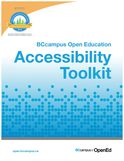 Other Canadian provinces are quickly catching up with the benchmarks set out by the AODA. In British Columbia, digital accessibility for online teaching and learning will be governed by the BC Accessibility 2024 .guidelines. BCampus recently published an Open Access eBook on how to make digital learning resources, such as eBooks, compliant with digital accessibility guidelines: More Resources
ReferencesAccessibility for Ontarians with Disabilities Act (2005, S.O. 2005, c. 11). Retrieved from https://www.ontario.ca/laws/statute/05a11
Berman, D. (2014, May 13). Web Accessibility Matters: Why Should We Care. [YouTube video]. Available from https://youtu.be/VIRx3RJzbZg College of the North Atlantic-Qatar (2018). [Web site]. Available from https://www.cna-qatar.com/ Coolidge, A., Doner, S., & Robertson, T. (2015). BCampus Open Education Accessibility Toolkit. [eBook]. Victoria, BC, Canada: BCampus. Available from https://opentextbc.ca/accessibilitytoolkit/ Council of Ontario Universities (2017a). Accessible Digital Documents & Websites. [Web page]. Accessible Campus. Available from http://www.accessiblecampus.ca/reference-library/accessible-digital-documents-websites/ (Links to an external site.) Council of Ontario Universities (2017b). Accessibility in E-Learning. [Web page]. Accessible Campus. Available from http://www.accessiblecampus.ca/tools-resources/educators-tool-kit/course-planning/accessibility-in-e-learning/ Described and Captioned Media Program (2018). Caption It Yourself. [Web page]. Available from https://dcmp.org/learn/213 Fraser Health (2018). [Website]. Available from https://www.fraserhealth.ca/ FutureLearn (n.d.). Digital Accessibility: Enabling Participation in the Information Society. [Massive Open Online Course]. Available from https://www.futurelearn.com/courses/digital-accessibility Interaction Design Foundation (2018). Web Fonts are Critical to the Online User Experience - Don’t Hurt Your Reader’s Eyes. [Web page]. Available from https://www.interaction-design.org/literature/article/web-fonts-are-critical-to-the-online-user-experience-don-t-hurt-your-reader-s-eyes The Paciello Group (n.d.). Colour Contrast Analyzer (CCA). [Web page]. Available from https://developer.paciellogroup.com/resources/contrastanalyser/ Mada (2017). Mada Assistive Technology Centre. [Web page]. Available from https://mada.org.qa/en/Pages/default.aspx Province of British Columbia (2014). Accessibility 2024: Making B.C. the most progressive province in Canada for people with disabilities by 2024. [PDF file]. Available from https://www2.gov.bc.ca/assets/gov/government/about-the-bc-government/accessible-bc/accessibility-2024/docs/accessibility2024_update_web.pdf Traxler, J. (2016). Inclusion in an age of mobility. Research In Learning Technology, 24. doi: http://dx.doi.org/10.3402/rlt.v24.31372 (Links to an external site.)Links to an external site. W3C (2016). Accessibility. [Web page] available from https://www.w3.org/standards/webdesign/accessibility
4 Comments
I seem to have occasion to repost my most viewed blog post to date once every few months, as the discussions around blanket bans on mobile devices in schools rear their ugly heads once again. This time, it's talk from the newly elected Progressive Conservative government in Ontario, Canada, who are placing a blanket ban on mobiles on the table as part of their incoming platform (Flanagan, 2018). (A few months back, it was the blanket ban on cell phones in schools in France (Willsher, 2017).) So... here it is again... reposted here so that this March 2016 post from my old blog site, the xPat_Letters Blog, has a new home (and new context) here on the brand new Power Learning Blog. Ban First, Ask Questions Later... The Problem with Calls to Ban Mobile Devices (updated) (originally posted March 2, 2016) I read the article Schools that Ban Mobile Devices See Better Results on the bus this morning. It is from May 2015, but someone had reposted the @guardian piece to my @Twitter feed. From my perspective as a mobile learning researcher, it presented troubling research findings: "Effect of ban on phones adds up to equivalent of extra week of classes over a pupil’s school year" (Doward, 2015) But, they’re not troubling for the obvious reason presented in the story. The premise of the story (and the research on which it was based) was that mobile devices are distracting students to the level of significant lost instructional time. And if schools want to see better test scores, then they had better start banning mobile devices. No. This is not the problem. A blanket ban on mobile devices because they distract learners is just the latest in a centuries-old trend of resisting technological change out of fear of the unknown. Steve Howard (2012, July 14) pointed out that as far back as 1815 a school principal fought against the introduction of paper and ink, and lamented that: Students today depend on paper too much. They don’t know how to write on a slate without getting chalk dust all over themselves. They can’t clean a slate properly. What will they do when they run out of paper? If we want to leverage new technologies to enhance learning experiences and bridge current inequities in the classroom, then we cannot succumb to knee-jerk reactions to alarmist statistics. As Homer Simpson once said: 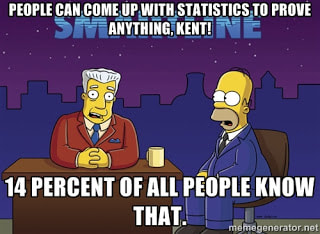 (Source: METTL, 2015) What IS troubling with this story (and research) are the questions that were NOT asked. The research shows an increase in achievement across ALL schools that have banned mobile devices versus ALL schools that allow them. BUT, no attempt is made to look at schools that actually plan for mobile technology integration. It could be that the majority of the schools polled have no such plans, in which case the argument that mobile devices only serve to distract students is likely true. But what of schools that have coordinated their technological infrastructure and pedagogical strategies to leverage mobile devices within the curriculum? I have predicated my mobile learning research to date on the problem that teachers and schools are the barriers to effective integration of mobile technologies because they lack confidence in the technology. The problem is NOT that mobile devices are allowed into schools. The problem is that we are not preparing teachers and schools for an environment of ubiquitous access to technology. From my dissertation (Power, 2015, p. 11): Ally (2014) noted that teacher training continues to be based on an outdated education system model that does not adequately prepare teachers to integrate mobile technologies into teaching practice. Lack of training in the pedagogical considerations for the integration of a specific type of technology can have a negative impact upon teachers’ perceptions of self-efficacy (Kenny et al, 2010). Technology will never replace good teachers. But technology can make good teachers better. Better teacher (and school) preparation will enable educators to make instructional design decisions that incorporate technology, and increase student engagement and access to learning opportunities and resources. My research has shown that professional development focused on scaffolding technology integration in the context of desired learning outcomes and appropriate pedagogical decisions does increase teachers’ interest and confidence in using educational technology. If teachers are interested, and plan how they will leverage technology in the classroom, then distraction will decrease and learning will improve. However, preparing teachers to leverage educational technology is not enough. We must also prepare students. Yes, if you let students who have had no guidance access mobile devices, then there is huge potential for them to be distracted. But, if you teach them digital citizenship and responsible use, there is less likelihood of distraction. And they will be better prepared for a world with near universal technology permeation. You cannot teach digital citizenship or responsible technology use with black and white policies of either banning all devices, or letting them all in. Unfortunately, the information technology support departments (and bureaucracies) of too many school systems (and higher education institutions) still operate with Acceptable Use Policies, which explicitly detail what is permissible and what is not. In contrast, Responsible Use Policies focus on making appropriate decisions about when and how to use technology. (Joe Countryman, Mary-Ann Vardakas & Melissa Taffe did a presentation on this, and prepared a wikipage about it for a Problem-Based Learning activity in the Digital Tools for Knowledge Construction course I teach at University of Ontario Institute of Technology.) Before policy makers, or the public at large, jump to the conclusion that the statistics presented in the Guardian (and also on CNN) point to the need for an outright ban on mobile devices in education, a number of questions should be considered:
References
Ally, M. & Prieto-Blázquez, J. (2014). What is the future of mobile learning in education? Mobile Learning Applications in Higher Education [Special Section]. Revista de Universidad y Sociedad del Conocimiento (RUSC), 11(1), 142-151. doi http://doi.dx.org/10.7238/rusc.v11i1.2033 Countryman, J., Vardakas, M., & Taffe, M. (2016). Acceptable use policies. Retrieved from http://educ5101jmm.pbworks.com/w/page/104432989/PBL%201%20-%20Group%204%20-%20Acceptable%20Use%20Policies Doward, J. (2015, May 16). Schools that ban mobile phones see better academic results. The Guardian. Retrieved from http://www.theguardian.com/education/2015/may/16/schools-mobile-phones-academic-results Flanagan, R. (2018, May 30). PC platform includes ban on cellphones in schools. CTV News Kitchener. Retrieved from kitchener.ctvnews.ca/pc-platform-includes-ban-on-cellphones-in-classrooms-1.3952316#_gus&_gucid=&_gup=twitter&_gsc=Qi5DSUU Howard, S. (2012, July 14). The ruin of education in our country – A positive thing [Web log post]. Retrieved from https://stevehoward999.wordpress.com/2012/07/14/the-ruin-of-education-in-our-country-a-positive-thing/ Kenny, R.F., Park, C.L., Van Neste-Kenny, J.M.C., & Burton, P.A. (2010). Mobile self-efficacy in Canadian nursing education programs. In M. Montebello, V. Camilleri and A. Dingli (Eds.), Proceedings of mLearn 2010, the 9th World Conference on Mobile Learning, Valletta, Malta. METTL (2015). The Homer Simpson guide to online assessments [Web log post]. Retrieved from https://mettl.com/blog/2015/08/the-homer-simpson-guide-to-psychometric-assessments/ Power, R. (2015). A framework for promoting teacher self-efficacy with mobile reusable learning objects (Doctoral dissertation, Athabasca University). Available from http://hdl.handle.net/10791/63 Power, R. (2016, March 2). Ban First, Ask Questions Later... The Problem with Calls to Ban Mobile Devices. [Web log post]. The xPat_Letters Blog. Available from http://robpower74.blogspot.com/2016/03/ban-first-ask-questions-later-problem.html Willsher, K. (2017, December 11). France to ban mobile phones in schools from September. The Guardian. Retrieved from https://www.theguardian.com/world/2017/dec/11/france-to-ban-mobile-phones-in-schools-from-september  If you've ever visited my site before, you may be asking "why the changes?" I've just completed the daunting task of rebranding from robpower.weebly.com to powerlearningsolutions.com -- and I'm excited about the change! So, what prompted the shift? Well, I got inspired after reading a blog post by Tim Slade titled 5 Tips for Elevating Your eLearning Career. Now, it's not that I think my career is stagnating... especially in light of this awesome feedback two of my students from a graduate-level EdTech course recently posted on Twitter: 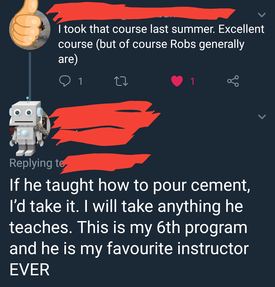 After reading Tim Slade's blog post (he really has a great blog, BTW!), I just got to feeling that my personal website had remained unchanged for far too long! I also got to thinking about the whole point of my site. I want it to be more than just an ePortfolio. And, I've been paying for the Power Learning Solutions domain name and URL for some time now, without actually using it for anything (I snatched it up with the intent of creating a website as a home for eLearning consultation work). So... I figured that the time had come to shift the focus away from just "Rob Power," and to put it onto the work that I do with educational technology, instructional design and development, mobile learning, and helping to prepare teachers to effectively leverage technology in their teaching and learning practice. The icon at the top of this post (which is one that I have been using for some time now) is a reflection of the overall rebranding -- as it symbolizes using educational technology to "push play," and put the world at our fingertips!
The End of xPat_Letters? So, now I'm left with the burning question... what do I do with my Twitter handle (@xPat_Letters)? I've been using that handle for several years, and have just broken the 1K follower mark. I know that I can update my handle without losing my followers... but it's hard to break the attachment! I created the handle when I lived and worked overseas at College of the North Atlantic-Qatar. I kept it after returning to Canada, as I felt it was still fitting. I might not be a geographical expat anymore -- but I still consider myself a digital expat. I'm not a digital "native" -- rather, I'm someone who's chosen to travel into the wonderful world of educational technology, and to experience all that it has to offer! But, I think that I will make the leap, and update my Twitter handle now, too. As part of my digital rebranding, I'll likely just take the leap within the next day or so! I'll also be taking the leap, and shifting blogging profiles (and strategies). I've been using Blogger for several years -- though I'll admit that I haven't been a very frequent blogger. Perhaps a new direction that I might take -- as I shift from my old xPat_Letters Blog to this new platform (integrated directly into the Power Learning Solutions website here in Weebly) -- is to start focusing more on creating posts to share educational technology tips, tricks, and resources! In the meantime, you can check out some of my older posts over at http://robpower74.blogspot.com/ Welcome to the new Power Learning Solutions! References: Power, R. (2018). The xPat_Letters blog. [Web log]. Available from http://robpower74.blogspot.com/ Slade, T. (2018, June 2). 5 tips for boosting your eLearning career. [Web log post]. TimSlade.com. Available from https://timslade.com/blog/elearning-career/ |

AuthorRob Power, EdD, is an Assistant Professor of Education, an instructional developer, and educational technology, mLearning, and open, blended, and distributed learning specialist. Recent PostsCategories
All
Archives
February 2024
Older Posts from the xPat_Letters Blog
|
- Home
- About
-
Publications
- Academic Publications
- Blog
-
Books
>
- The ALT Text
- Blended Langauge Learning: Evidence-Based Trends and Applications
- eLearning Essentials 2020
- Everyday ID
- Handbook of Mobile Teaching and Learning (2nd Edition)
- IAmLearning
- ID and Tech for Rapid Change
- ID and Tech Vol 2
- ID and Tech Vol 3
- Inclusive Peer Learning & Augmented Reality in Higher Education
- Mobile and ubiquitous learning: An international handbook
- Operating System Fundamentals
- Seamless Learning in Higher Education
- Seamless Learning in Higher Educaton vol 2
- Technology and the Curriculum: Summer 2018
- Technology and the Curriculum: Summer 2019
- Technology and the Curriculum: Summer 2022
- Technology and the Curriculum: Summer 2023
- Thriving Online: A Guide for Busy Educators
- Fiction
- Conference Presentations
- Power Learning Daily News
- Courses
- Research
- Resources
 RSS Feed
